Pretext: Text Height Without DOM Reflow
Pretext measures multi-line text height using canvas — no DOM, no reflow. prepare() segments and measures once. layout() runs pure arithmetic at resize. Here's what that actually means for UI performance.
TL;DR
Pretext measures multi-line text height using canvas — no DOM, no reflow. Call prepare() once to segment and measure text; call layout() at resize time for pure arithmetic. 19ms for 500 texts on prepare. 0.09ms on layout. Handles bidi, CJK, and emojis correctly.
The browser won't tell you how tall text will be until it renders it.
That sounds like a minor limitation until you hit it in practice. Virtualized lists need row heights before rendering. Canvas renderers need line positions before drawing. Scroll anchoring needs dimensions before new content arrives. Every one of these requires a number the browser refuses to give you in advance.
The standard answer is DOM measurement. Put the element in the page, call getBoundingClientRect or offsetHeight, read the number. Works fine for a single element. For 500 list items it's a performance cliff — every one of those calls forces the browser to stop and recompute the full page layout before answering. That's what layout reflow means. It's one of the most expensive operations in the browser and you're triggering it hundreds of times.
The workarounds are all compromises. Fixed-height rows until content is dynamic. Line count estimates with a multiplier until language complexity breaks the math. A hidden off-screen container as a measuring tape until the measurement itself causes reflow.
Pretext is a different approach.
How it works
The library uses the browser's canvas measureText API to measure text without touching the DOM. Canvas measurement doesn't trigger layout — it goes directly through the font engine and returns glyph metrics. Pretext uses those metrics to reconstruct what the browser's line-breaking algorithm would produce, without rendering anything.
The API is two calls:
import { prepare, layout } from '@chenglou/pretext'

const prepared = prepare('your text content', '16px Inter')
const { height, lineCount } = layout(prepared, containerWidth, lineHeight)
prepare() does the one-time work: normalize whitespace, segment text into grapheme clusters, apply Unicode line-break rules, measure segment widths via canvas. Returns an opaque handle.
layout() takes that handle and runs pure arithmetic over cached measurements. No DOM. No canvas calls. Just addition and comparison.
The performance profile from the library's own benchmarks: prepare() runs 19ms for a batch of 500 texts. layout() runs 0.09ms for that same batch.
The implication for resize handling: call prepare() once when text changes, call layout() on every resize event without re-measuring. The expensive work is already done. The resize path is arithmetic.
Language support is where it actually earns its keep
Most text measurement implementations fall apart at the edges. Splitting by spaces and multiplying by line height breaks on Arabic and Hebrew (right-to-left text), CJK characters (their own line-breaking rules that have nothing to do with spaces), multi-codepoint emojis (naive implementations split them at the wrong boundary), and anything that mixes directionality.
Pretext handles these correctly because it works at the grapheme cluster level — the visual character level, not the Unicode code point level. Proper Unicode segmentation throughout.
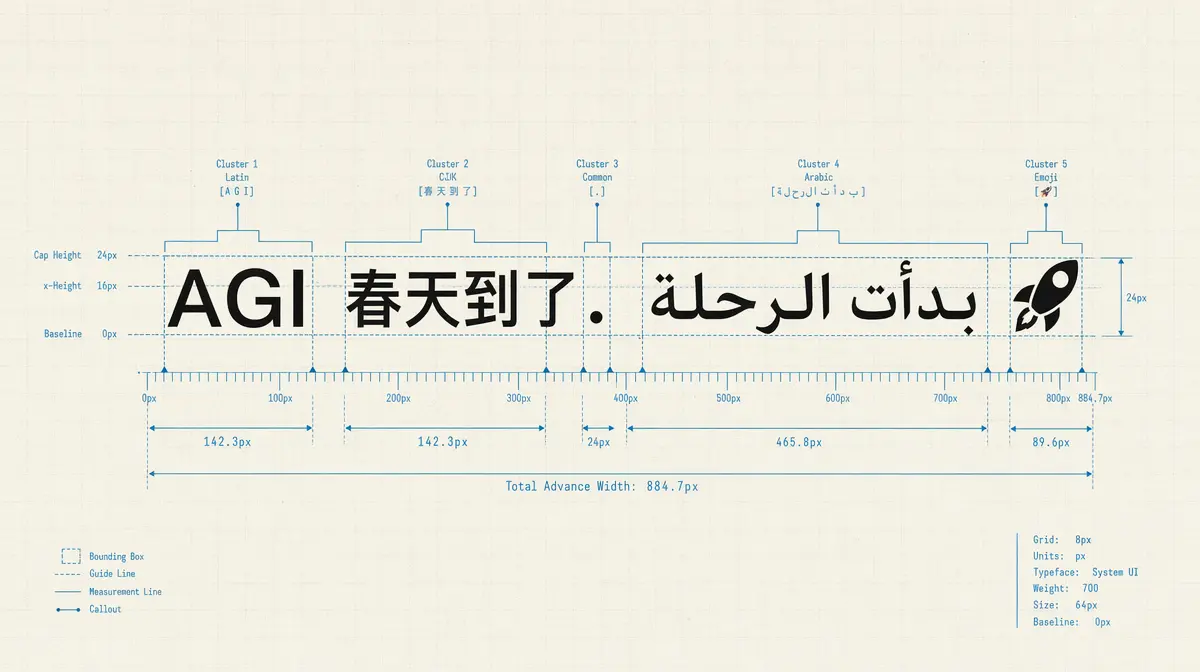
The library's own benchmark string is 'AGI 春天到了. بدأت الرحلة 🚀'. CJK, Arabic RTL mixed with LTR, multi-codepoint emoji. The test is designed to hit all the cases that break naive implementations.
When you need the lines, not just the height
The prepare/layout pair covers the common case. If you're rendering text outside the DOM — in a canvas renderer, WebGL, or server-side — you need the actual line strings.
prepareWithSegments + layoutWithLines gives you those:
import { prepareWithSegments, layoutWithLines } from '@chenglou/pretext'

const prepared = prepareWithSegments('your text', '18px "Helvetica Neue"')
const { lines } = layoutWithLines(prepared, 320, 26)
for (let i = 0; i < lines.length; i++) {
  ctx.fillText(lines[i].text, 0, i * 26)
}
Each line's text string and measured width. No DOM node created.
walkLineRanges goes lower still — line widths and cursor positions without building strings. The use case: binary searching for the narrowest container that fits text within a target line count. Run the search with walkLineRanges (fast, no allocations), then call layoutWithLines once at the final width. This is what shrink-wrap text layout looks like without guessing.
layoutNextLine handles variable-width flows — each line gets a different max width. This is how you flow text around a floated element in a canvas renderer. Previously not possible without a DOM measurement workaround.
What to watch for
The font argument to prepare() must match your CSS font shorthand exactly — same family, size, weight, style as what the browser will use to render the text. A mismatch gives you wrong measurements with nothing to catch it. The library explicitly calls out system-ui as unsafe on macOS; font substitution behavior is inconsistent. Use a named font.
Pretext targets white-space: normal with overflow-wrap: break-word. Pass { whiteSpace: 'pre-wrap' } for textarea-style content where spaces and newlines are preserved. Other white-space values aren't supported.
prepare() caches per-segment measurements. If you're cycling through many different fonts or large numbers of text variants, call clearCache() to release memory.
Install
npm install @chenglou/pretext
Source and demos at chenglou.me/pretext.
The problem — knowing text height before rendering — sounds like a small thing until you're building a UI that actually depends on it.